
The Census 2027 is brought a major digital transformation with the introduction of self enumeration, allowing citizens to submit their household data online. Census 2027 Self enumeration is a Online process which enables citizens to register and submit their details before enumerator come to their place . Once enumerator comes they verify and submit in census 2027 form . This provide an option to double check the data entered by citizen which in turn leads to correctness of data.
In this article, you will learn Census 2027 Self Enumeration Online Process, registration steps, required details, and important guidelines.
What is Census 2027 Self Enumeration?
The SE portal will remain open for 15 days prior to the start of House to House House listing Operations (HLO) by the Enumerator as per specific period notified by State/UT. Census 2027 Self Enumeration is a facility where citizens can:
- Fill their census data online
- Add family member details
- Submit information without waiting for a government enumerator .
- It can be verified on Enumerator visit
This initiative is part of India’s push toward digital governance and smart data collection.
Key Features of Census 2027 Self Enumeration
- Online data submission through portal/app by Citizen
- No physical visit required to Data Submission
- Entered data will be verified by Enumerator
- Secure and confidential process
- Multi-language support
- Easy of Data Entering
- Faster data processing
Census 2027 Self Enumeration Process (Step-by-Step)
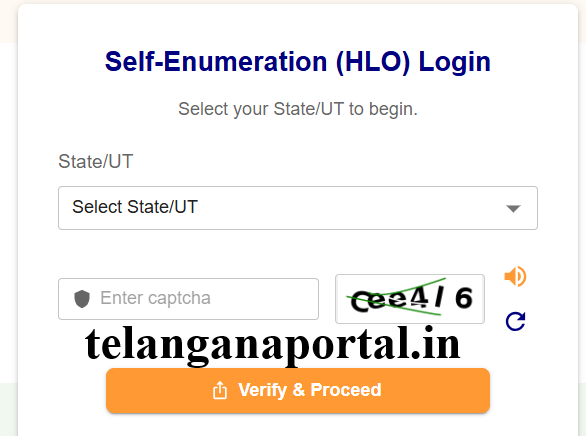
Step 1: Visit Official Portal
- Go to official Website of Self Enumeration portal i.e. https://se.census.gov.in
- Select your State/UT
- Enter captcha and proceed
- User are advised to Use desktop/laptop for better map accuracy
Step 2: Household Registration
Enter the following details for Household registration .
- Name of Head of Household (This cannot be changed in later stages )
- Mobile number (one per household only)
- Email ID (optional)
Step 3: Language Selection & OTP Verification
- Choose your preferred language (this cannot be changed in later stages)
- Verify OTP sent to mobile . Verify the mobile number by entering the OTP sent
Step 4: Enter Location Details
Provide you location details such as
- Select District
- Select Village/Town
- Provide Locality
- Provide Nearby landmark
- Enter PIN code
This address is used to map the enumerator for verification. Make sure you enter these details correctly.
Step 5: Mark Your House on Map
- A digital map will appear in the form
- Drag the marker to your exact house location Save and confirm
- This location is used to map the enumerator of your local area.
- Make sure you are selected the correct location
Step 6: Fill Census Questionnaire
- Enter housing and household details
- In case of any doubts use tooltips and FAQs for help
- Complete each page before moving forward
Step 7: Review & Save Draft
- Preview all entered details
- Edit if needed
- Save as draft or proceed
- Residents are advised to check the data in preview mode.
Step 8: Final Submission
- Click on Final Submit option.
- Your data will be locked and submission is accepted .
- Upon successful submission a 11-digit SE ID (starting with “H”) is generated and Sent via SMS/email
Residents are advised to keep this SE ID carefully, as it is required at further stages of Self Eumaeration process .
Step 9: Enumerator Verification
- Enumerator will visit your house , Provide your SE ID to them . They will verify the data .
- If the data is matched , they will accept the data and submit i CENSUS 2027
- If the data is not matched then data will be collected again from residents .
Required Documents for Census Self Enumeration
Residents are advised to keep following documents while entering the data in CENSUS 2027 Self Enumeration Portal . These documents enable you to enter data without any mistakes .
- Aadhaar Card and Pan Card which serves as Identity Proof
- Mobile number
- Address Proof anything accepted by CENSUS 2027
- Family member information like EPDS Card or Ration Card
- Education and occupation details
Also Read
Telangana Ration Card Apply Online, Status Check, Eligibility Download FSC
Indiramma Kutumba Jeevitha Bheema – ₹5 Lakh Life Insurance for All Full Details
FAQs on Census 2027 Self Enumeration
How much time does it take?
Around 15–20 minutes.
Can I edit after final submission?
No, data gets locked after submission.
What is SE ID?
A unique 11-digit ID generated after submission.
Is map marking mandatory?
Yes, it helps in accurate location verification.
What if I don’t complete it?
Enumerator will visit and collect data manually.